


Towtaled - Incident Tracking
3.733.00 Reviews
App Specs
- Version
- 4.3.10
- Updated On
- License
- Free
- Downloads
- 10,000+
- Developer
- Towtaled Inc.
- Categories
- Auto & Vehicles
- Platform
- Android
Screenshots
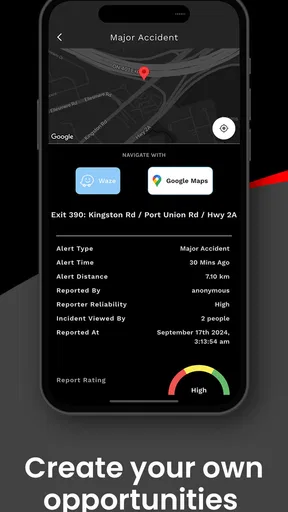
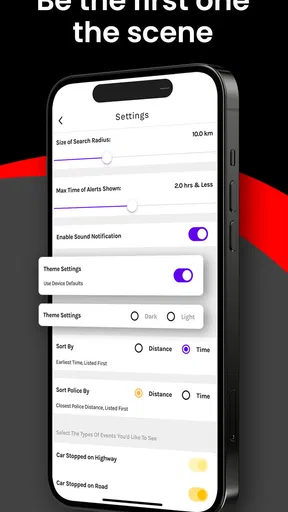
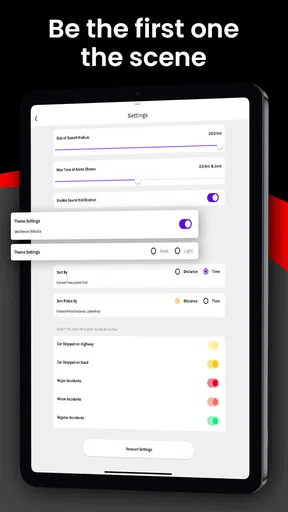
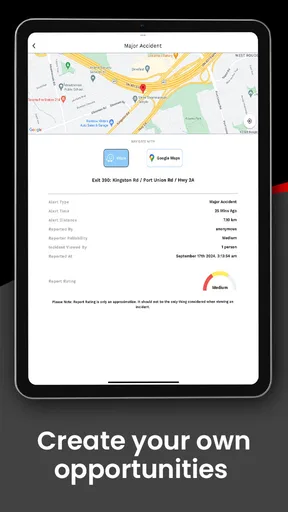
 Analysis by AppCompare
When a vehicle breaks down, the difficult part is rarely just finding a tow truck. The real challenge is getting the request in front of someone who can act quickly, then keeping track of what happens next. Towtaled - Incident Tracking approaches that problem from the professional side: it is an Auto & Vehicles app designed for people who want to receive and manage towing opportunities rather than simply request roadside help. After spending time with it, I see it as a focused tool for drivers and towing operators who need a steady view of incoming work.
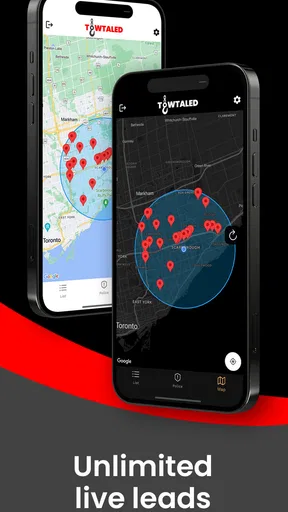
The app is free to install, and its central appeal is straightforward: it aims to help users earn more by presenting live leads. That makes it very different from a typical roadside-assistance app aimed at stranded motorists. If you are a tow operator looking for another channel for potential jobs, the idea is easy to understand. If you are only trying to arrange a single tow for yourself, this is probably not the app I would reach for first.
The important distinction is who the app is built to serve. Towtaled comes from Towtaled Inc. and carries an Everyone content rating, but its practical audience is much narrower than that label suggests. The interface and workflow matter most to people who can respond to vehicle incidents, evaluate whether a lead is worthwhile, and turn a notification or listing into a completed job.
How Towtaled feels when speed matters
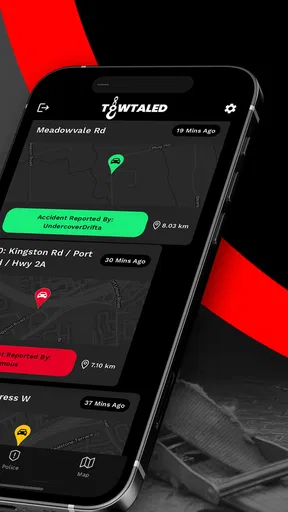
Speed is the first thing I consider with an incident-tracking tool. A lead that arrives too late, takes too long to understand, or disappears into a cluttered screen has limited value. Towtaled is built around live leads, so its usefulness depends less on elaborate presentation and more on how quickly I can recognize an opportunity and decide what to do with it.
In everyday use, I would treat the app as something to check repeatedly rather than a tool I open only at the end of the day. That mindset is important. The promise of ongoing opportunities does not mean every lead will suit every operator, and a busy tow professional still needs to filter decisions through distance, vehicle type, schedule, equipment, and likely return. The app can place possibilities in front of me, but it cannot replace that judgment.
One practical workflow is to review leads during natural pauses: before leaving a yard, after finishing a call, or while waiting for a customer to provide location details. That reduces the temptation to stare at the screen continuously. It also makes the app fit better into a working day, where safe driving and customer communication must come before monitoring an app.
I would not describe Towtaled as a complete replacement for phone calls, dispatch habits, or existing business records. It is better understood as an additional source of work. The speed advantage comes from having another place to discover opportunities, not from eliminating every other step involved in accepting and completing a tow.
Worth Reading Before You Choose

EA SPORTS FC Mobile 26 Is a Bigger Football Game, but It Takes Time

Flipboard Shows What News Apps Must Do Beyond the Feed

Switching to Android Auto Means Rethinking Your Driving Routine

Google Calendar Makes a Crowded Week Easier to Manage

Ludo King Makes the Most of the Minutes Between Plans

Baby Panda World Brings Quick Play to Modern Phones, but Its Game Library Feels Busy
There is also a trade-off in the live-lead model. More opportunities can mean more decisions. If I respond to everything without a clear operating area or job-selection routine, the stream can become distracting rather than productive. The best experience comes from deciding in advance what kinds of incidents are worth pursuing and checking the app with that filter already in mind.
What fast response really means here
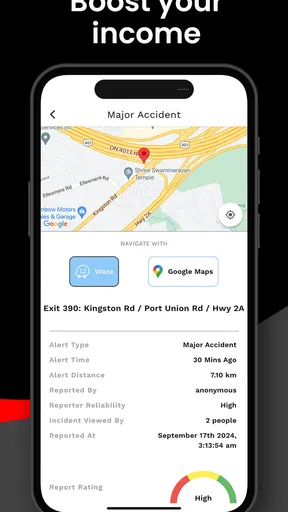
For a towing professional, quick access is only one part of response time. The lead still needs to be understood, assessed, and acted on. I would keep essential business information and equipment details ready elsewhere so that opening a promising opportunity does not become a long administrative exercise. That preparation is one of the less obvious ways to get more value from an app like this.
I would also avoid judging the app solely by how many leads appear. A smaller number of relevant opportunities may be more useful than a busy feed filled with jobs outside my service area. The meaningful question is whether the available leads fit my actual capacity. Towtaled can support that process, but the operator still controls the quality of the final decision.
How it holds up during heavy use
The most demanding moment is not necessarily a single incident. It is a stretch of time when several potential jobs appear while I am already handling customers, driving between locations, or coordinating equipment. That is when a focused lead tool either earns its place or becomes another source of interruption.
I would use Towtaled alongside a simple priority system. First, I would identify jobs that are geographically sensible. Next, I would separate urgent opportunities from those that can wait for a callback or closer review. Finally, I would compare the lead with current workload rather than accepting it simply because it is available. This workflow protects against a common mistake: confusing activity with profitability.
A useful habit is to make one deliberate review after completing a job. Instead of checking every few minutes, I can use that moment to see whether anything relevant has appeared, then return attention to the road or customer. This is especially important for solo operators, who may otherwise split their attention between a live incident and a new opportunity.
Heavy use also exposes the difference between an app that supplies leads and a full dispatch platform. Towtaled may help me discover work, but I would still want a separate method for tracking accepted jobs, customer notes, invoices, mileage, and equipment needs unless my existing business process already covers those tasks. That is not a flaw in a focused incident tracker; it is simply a boundary I would plan around before relying on it every day.
The app’s in-app purchase range is listed as $29.99 to $59.99 per item. Because that can affect the cost of using the service, I would examine the purchase choices carefully before committing. A free installation is useful for trying the basic experience, but the real business question is whether the value of suitable leads justifies any optional spending for my operation.
A realistic working-day scenario
Imagine I finish a morning roadside call and have a short gap before the next scheduled task. I open Towtaled, scan the available incident opportunities, and find one that is close enough to fit my route. Before accepting anything, I compare the location with fuel, traffic, equipment, and the time needed to finish my current commitments. If the job makes sense, the app has helped me find a potential addition to the day. If it does not, I can leave it and avoid turning a promising-looking lead into an expensive detour.
That example shows where the app is strongest: it can widen the funnel of possible work. It does not guarantee that every opportunity is profitable, nearby, or compatible with my truck. The operator who benefits most is someone willing to make a quick but disciplined assessment instead of treating every live lead as an automatic booking.
Reliability, recovery, and the confidence to depend on it
Reliability matters more in incident tracking than in many casual apps. A missed opportunity may mean lost income, while a confusing or interrupted workflow can create stress during an already time-sensitive situation. My standard would be simple: the app should be easy to return to, and I should have a backup habit for important details.
I would not make Towtaled the only record of a job. Even when an app is working well, business continuity is stronger when key information is also captured through a trusted phone contact, calendar, dispatch system, or written process. That is particularly sensible for operators who work in areas with inconsistent connectivity or who cannot afford to lose track of a customer while moving between locations.
Recovery is also about human behavior. If I am interrupted while reviewing a lead, I want to be able to reopen the app and continue without relying on memory. I would therefore make a habit of confirming the essential details before switching to another task. The app can support discovery, but a deliberate confirmation routine protects against accepting the wrong job or forgetting a promising one.
The current version is 4.3.10, and the app supports Android devices running version 7.0 or newer. That gives it a reasonably broad device reach for people who are not using the newest phone, although operating-system compatibility alone does not guarantee the same experience on every handset. Older hardware may feel less comfortable during rapid switching between calls, maps, messages, and the app itself.
Towtaled has an average rating of 3.7 from around 199 ratings, with about 33 written reviews. I read that as a sign to keep expectations practical rather than assuming a flawless experience for every operator. The rating is not a reason to dismiss the app, but it does encourage me to test it in my own working area before building my entire lead strategy around it.
What to do when the app is not enough
If a lead is important, I would record the location and contact information in my normal business workflow as soon as it is safe to do so. If the app becomes unavailable or I need to switch devices, that backup can prevent a missed follow-up. This is a particularly valuable tip for small towing businesses where one person may be handling driving, customer contact, dispatching, and payment administration.
I would also keep expectations clear with customers. An incident-tracking lead is not automatically the same thing as a confirmed appointment. Before setting out, I would verify the practical details through the appropriate communication channel. That extra step may feel slower, but it is far better than discovering that the vehicle location, access conditions, or requested service does not match the equipment available.
Device limits and the cost of attention
Because Towtaled is a mobile app, the phone becomes part of the work environment. That is convenient, but it also creates constraints. A small display, an older device, poor signal, low battery, or constant switching between work apps can make any live-lead workflow harder to manage. The app is most useful when the phone is treated as one component of a broader setup, not as the entire dispatch office.
I would prepare the device before a busy shift. A charged phone, a stable mounting arrangement, and a clear rule never to interact while driving are more important than squeezing every possible minute out of the lead feed. If I need to inspect a job, I would pull over or wait until the vehicle is safely parked. No potential tow is worth unsafe screen use.
The minimum Android requirement of 7.0 means that some older phones can still be candidates, which is helpful for operators who keep a dedicated work handset. Still, an older phone may have slower app switching, less comfortable multitasking, or limited battery life. A dedicated device can make sense, but only if the cost and maintenance are justified by the number of relevant leads it helps secure.
The Everyone age rating makes the app broadly accessible from a content perspective, but that should not be confused with universal suitability. A private driver who needs roadside assistance may find the app’s professional focus less useful than a conventional roadside service or direct call to a local towing company. Towtaled makes more sense for someone on the supply side of the incident: a person or business able to respond to towing work.
Resource demands are best judged in context. Any app that displays changing opportunities may compete for attention with navigation, calls, messaging, and payment tools. I would avoid running an unnecessarily crowded setup on an older phone and would close unrelated apps before a busy period. That is not a special requirement unique to Towtaled, but it becomes more noticeable when the phone is supporting an entire workday.
Who should choose it, and who should skip it
I would recommend trying Towtaled if you are an independent tow operator, a small towing company, or another roadside professional looking for an extra way to discover jobs. It is particularly appealing when your current business depends heavily on repeat customers or a single dispatch source and you want to broaden the number of opportunities you can review.
I would be more cautious if your operation already has a mature dispatch platform that supplies enough work and handles scheduling, customer records, billing, and follow-up in one place. Adding another lead channel can create duplicate work. In that situation, Towtaled is worthwhile only if its opportunities are genuinely different or more useful than what you already receive.
I would skip it as a first choice if I were a motorist searching for one emergency tow. The app’s purpose is closer to helping professionals find incidents than helping a stranded driver compare consumer roadside services. Choosing the wrong type of app can waste time, especially when the vehicle is blocking traffic or the weather is poor.
My performance verdict after weighing the trade-offs
Towtaled - Incident Tracking has a clear role. It is a free Auto & Vehicles app from Towtaled Inc. that gives towing professionals another way to look for live work. Its strongest performance benefit is not a flashy interface or a promise that every job will be worthwhile; it is the possibility of keeping a wider stream of opportunities within reach during the working day.
My recommendation comes with conditions. I would use it as a lead source, not as my only dispatch record. I would test it in the areas where I actually operate, measure the quality of the opportunities through my own results, and review any in-app purchase carefully before spending. The listed purchase range of $29.99 to $59.99 per item makes that trial-and-evaluate approach especially sensible.
The app’s scale is still fairly modest, with over 10 thousand installs, so I would approach it as a focused tool to evaluate rather than an automatic replacement for established towing networks. Its 3.7 average from around 199 ratings supports that measured view. There is enough interest to make it worth investigating, but not enough reason to assume it will fit every market or workflow without testing.
In my experience, the best results would come from an operator who is organized, responds selectively, and already knows how to turn a lead into a safe and profitable service call. Someone expecting the app to handle every business task, guarantee immediate jobs, or replace direct customer communication may be disappointed. Someone looking for an additional window onto possible work may find it genuinely useful.
My final take: Towtaled is worth a practical trial for towing professionals, provided you treat its live leads as opportunities to evaluate rather than promises. It can add flexibility to a working day, but the real performance comes from the workflow around it: safe checking, quick qualification, backup records, and honest calculation of whether each job fits the route and equipment. That balance is what turns the app from another notification source into a sensible business tool.
Pros
- Quickly log incidents with essential details and timestamps.
- Keeps incident records organized for easier follow-up.
- Useful for teams needing a focused tracking workflow.
- Helps maintain a consistent history of reported issues.
- Can improve accountability by recording incident ownership.
Cons
- May feel too specialized for users needing broader project tools.
- Requires consistent data entry to keep records useful.
- Advanced reporting options may be limited for larger teams.
- Incident tracking can become cumbersome without clear categories.
- Some features may depend on account setup or team permissions.
FAQs for Towtaled - Incident Tracking
What is Towtaled - Incident Tracking used for?
Towtaled - Incident Tracking is designed to help users record, organize, and follow up on incidents in a structured way. It can be useful for documenting workplace events, maintenance problems, safety concerns, service issues, or other situations that require attention. Instead of relying on scattered notes or messages, the app gives incident information a central place where it can be reviewed and managed more consistently.
Who can benefit from using Towtaled - Incident Tracking?
The app may be useful for teams, supervisors, property managers, field workers, safety personnel, and organizations that need a clearer incident-reporting process. It is especially helpful when several people must share updates or review the status of an issue. Before downloading, users should confirm that the app’s available workflows, permissions, and reporting options match their organization’s specific requirements.
What information can be included in an incident report?
Depending on the version and configuration available on your device, Towtaled - Incident Tracking may allow users to enter details such as the incident description, location, date, people involved, current status, and follow-up actions. Users should take care when adding sensitive or personal information. It is also a good idea to review the organization’s privacy rules before submitting reports through the app.
Is Towtaled - Incident Tracking suitable for real-time emergency response?
Towtaled - Incident Tracking can support documentation and follow-up, but it should not automatically be treated as a replacement for emergency services, direct communication, or an organization’s official emergency procedures. If someone is in immediate danger, contact the appropriate emergency authority first. The app is better understood as an incident-management tool for recording information and monitoring resolution after an issue has been identified.
What should I check before downloading Towtaled - Incident Tracking?
Before installing the app, check whether it is compatible with your Android or iOS device and whether an account, organization invitation, or administrator setup is required. Also review the permissions it requests, its data-handling information, and any subscription or access limitations. If you plan to use it at work, confirm that your team already supports the platform so reports can be shared and managed properly.


